From Webhooks to Databases: A Real-Time Data Journey with Danube Connect
Building resilient data pipelines shouldn’t require rebuilding your entire infrastructure.
Imagine this: You’re building a payment processing system. Stripe sends webhooks for every transaction—succeeded, failed, refunded, canceled. You need these events in your database for analytics, compliance, and real-time dashboards. Simple enough, right?
But then reality hits:
- What happens when your webhook handler crashes?
- How do you ensure messages aren’t lost during deployments?
- What if you need to scale horizontally to handle 10,000 events/second?
- How do you validate that incoming data matches your expected schema?
- What about routing to multiple destinations—databases, analytics, vector stores?
You could write custom scripts with retry logic, schema validation, and database drivers. But now you’re maintaining infrastructure code instead of building features. There’s a better way.
The Connector Pattern: Separation of Concerns
Modern data systems embrace a simple principle: decouple data movement from data processing.
External System → Connector → Message Broker → Connector → Target System
This architecture gives you:
- Isolation - Connector failures don’t crash your broker or other systems
- Scalability - Scale each component independently based on load
- Flexibility - Add new integrations without touching existing code
- Reliability - Built-in retry logic, exactly-once delivery, schema validation
This is where Danube Connect comes in.
What is Danube Connect?
Danube Connect is a plug-and-play connector framework for Danube, a high-performance message broker written in pure Rust. Instead of embedding integrations directly into the broker (which creates tight coupling and crash risks), connectors run as standalone processes that communicate via gRPC.
Think of connectors as bridges between Danube and the rest of your infrastructure:
- Source Connectors import data into Danube (MQTT → Danube, Webhooks → Danube, PostgreSQL CDC → Danube)
- Sink Connectors export data from Danube (Danube → SurrealDB, Danube → Delta Lake, Danube → Qdrant)
Each connector is a lightweight, independent binary that handles:
- External system integration (authentication, connection pooling, API specifics)
- Data transformation (from external format to Danube messages and vice versa)
- Error handling (retries, circuit breakers, backoff strategies)
- Observability (Prometheus metrics, structured logging, health endpoints)
You focus on business logic. The framework handles the plumbing.
Learn more: Danube Connect Overview
Source Connectors: Bringing Data In
Source connectors act as data importers, continuously pulling or receiving data from external systems and publishing it to Danube topics.
How They Work
A source connector implements just three required methods:
initialize()- Connect to the external system (MQTT broker, HTTP server, database)producer_configs()- Define which Danube topics you’ll publish topoll()- Fetch new data and return it asSourceRecords
The runtime handles everything else:
- Creating Danube producers with the correct configuration
- Schema validation against your JSON schemas or other formats
- Serialization based on schema type (JSON, Avro, Protobuf)
- Publishing to Danube with retry logic and delivery guarantees
- Metrics collection and health monitoring
Real-World Example: HTTP Webhook Source
async fn poll(&mut self) -> ConnectorResult<Vec<SourceRecord>> {
    // Drain in-memory buffer filled by HTTP requests
    let events = self.buffer.drain(..).collect();

    // Transform to SourceRecords - runtime handles schema validation
    events.into_iter()
        .map(|event| SourceRecord::from_json(&event.topic, &event.payload))
        .collect()
}
That’s it. The runtime validates against your JSON schema, serializes the payload, attaches schema metadata, and publishes to Danube. Zero boilerplate.
Benefits
- Schema-First Design - Define schemas in TOML, runtime validates automatically
- Type Safety - Work with
serde_json::Value, not raw bytes - Zero Schema Boilerplate - No manual serialization or validation code
- Built-in Retry Logic - Exponential backoff for transient failures
- Observable - Prometheus metrics, structured logging, health checks
Learn more: Source Connector Development
Sink Connectors: Moving Data Out
Sink connectors do the opposite—they export data from Danube to external systems like databases, data lakes, vector stores, or analytics platforms.
How They Work
A sink connector implements three required methods:
initialize()- Connect to target system (database, API, object storage)consumer_configs()- Define which Danube topics to consume fromprocess()orprocess_batch()- Write data to the target system
The runtime handles the heavy lifting:
- Creating Danube consumers with subscription management
- Consuming messages from topics (with partitioning support)
- Schema deserialization—you receive typed
serde_json::Valuedata, already validated - Message buffering and batching for performance
- Retry logic with exponential backoff
- Graceful shutdown and offset management
Real-World Example: SurrealDB Sink
async fn process_batch(&mut self, records: Vec<SinkRecord>) -> ConnectorResult<()> {
    // Group by target table
    for (table, batch) in self.group_by_table(records) {
        // Transform to database format - data already deserialized by runtime
        let db_records: Vec<_> = batch.iter()
            .map(|r| self.transform_for_surrealdb(r))
            .collect();

        // Bulk insert
        self.db.create(table).content(db_records).await?;
    }
    Ok(())
}
Notice what you don’t see:
- ❌ Raw byte deserialization (runtime already did it)
- ❌ Schema fetching from registry (runtime cached it)
- ❌ Message acknowledgment logic (runtime handles it)
- ❌ Retry mechanisms (runtime provides them)
Benefits
- Pre-Validated Data - Schema validation happens at ingestion (source side)
- Type-Safe Access -
record.payload()returnsserde_json::Value, or userecord.as_type::<T>() - Batching Built-In -
process_batch()for 10-100x better throughput - Partitioning Transparency - Subscribe to logical topics, not partition details
- Flexible Subscriptions - Shared (parallel), Exclusive (ordered), or Failover (HA)
Learn more: Sink Connector Development
A Real Journey: Stripe Webhooks to SurrealDB
Let’s walk through a complete example that demonstrates the full power of Danube Connect. We’ll build a real-time payment event pipeline:
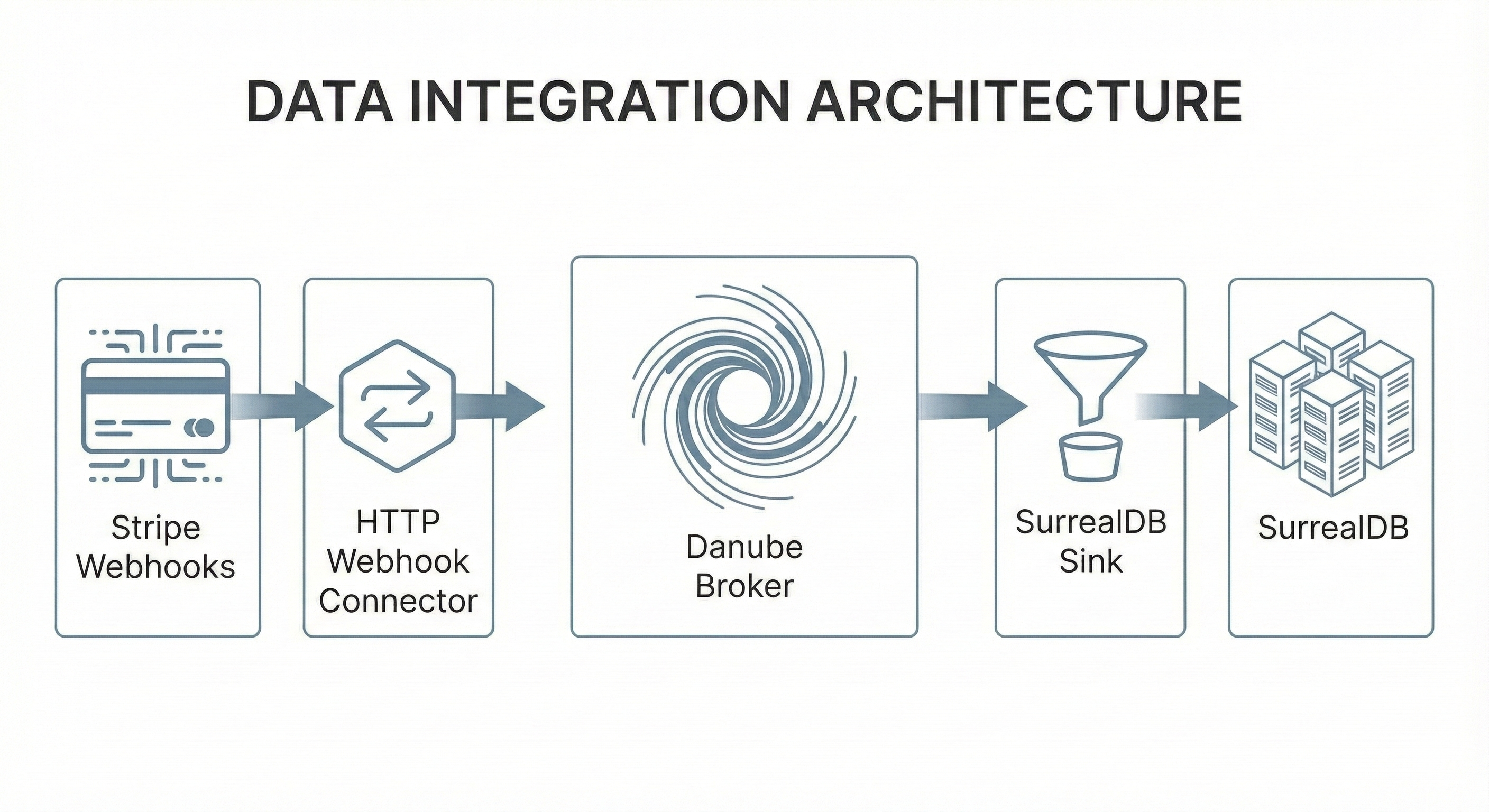
Goal: Ingest payment events from Stripe, validate their structure, store them in SurrealDB for analytics, and query them in real-time.
Architecture Overview
The example uses pre-built Docker images—no compilation required:
- Infrastructure: etcd (metadata), Danube broker (messaging)
- Source: Webhook connector (
ghcr.io/danube-messaging/danube-source-webhook:v0.2.0) - Sink: SurrealDB connector (
ghcr.io/danube-messaging/danube-sink-surrealdb:v0.2.1) - Database: SurrealDB (storage)
Everything orchestrated with Docker Compose. Total startup time: ~10 seconds.
File Structure
example_e2e/
├── docker-compose.yml           # Service orchestration
├── webhook-connector.toml       # Source connector config
├── surrealdb-sink-connector.toml # Sink connector config
├── schemas/
│   └── payment.json             # JSON Schema definition
└── send-webhook.sh              # Test script
Step 1: Define the Schema
First, we define what valid payment events look like using JSON Schema:
{
  "$schema": "http://json-schema.org/draft-07/schema#",
  "type": "object",
  "required": ["event", "amount", "currency", "timestamp"],
  "properties": {
    "event": {
      "type": "string",
      "enum": ["payment.succeeded", "payment.failed", "payment.refunded", "payment.canceled"]
    },
    "amount": { "type": "integer", "minimum": 0 },
    "currency": { "type": "string", "pattern": "^[A-Z]{3}$" },
    "timestamp": { "type": "integer" }
  }
}
This schema ensures:
- ✅ Only valid event types are accepted
- ✅ Amounts are non-negative integers
- ✅ Currency codes are 3-letter uppercase (USD, EUR, etc.)
- ✅ Timestamps are present
Invalid data gets rejected at the webhook endpoint before it enters Danube.
Step 2: Configure the Webhook Source
The webhook connector needs to know:
- Where to send data (Danube topic)
- Which schema to validate against
- How many partitions for scalability
danube_service_url = "http://danube-broker:6650"
connector_name = "webhook-source-e2e"

# Schema definition
[[schemas]]
topic = "/stripe/payments"
subject = "stripe-payment-v1"
schema_type = "json_schema"
schema_file = "schemas/payment.json"
auto_register = true

# HTTP endpoint configuration
[webhook]
host = "0.0.0.0"
port = 8080

[[webhook.endpoints]]
path = "/webhooks/stripe/payments"
danube_topic = "/stripe/payments"
partitions = 4                    # Parallel processing
reliable_dispatch = false
What happens when a webhook arrives:
- Connector receives POST to
/webhooks/stripe/payments - Validates payload against
payment.jsonschema - Creates
SourceRecordwith validated data - Runtime publishes to
/stripe/paymentstopic (across 4 partitions) - Returns HTTP 200 to Stripe
Step 3: Configure the SurrealDB Sink
The sink connector consumes from the same topic and writes to the database:
danube_service_url = "http://danube-broker:6650"
connector_name = "surrealdb-sink-e2e"

[surrealdb]
url = "surrealdb:8000"
namespace = "default"
database = "default"
username = "root"
password = "root"

# Topic → Table mapping
[[surrealdb.topic_mappings]]
topic = "/stripe/payments"               # Logical topic (partitions transparent!)
subscription = "surrealdb-payment-sink"
subscription_type = "Shared"             # Parallel consumption
table = "stripe_payments"
expected_schema_subject = "stripe-payment-v1"  # Verify schema
batch_size = 50
flush_interval_ms = 1000
Key points:
- Logical Topics: Sink subscribes to
/stripe/payments, not partition details - Partitioning Transparency: Runtime handles partition routing—sink sees logical topic only
- Schema Verification: Optional check that messages have expected schema
- Batching: Collects 50 records or waits 1 second, then bulk inserts
- Shared Subscription: Multiple sink instances can share the load
Step 4: Start the Pipeline
cd example_e2e
docker-compose up -d
The initialization sequence:
- etcd starts (metadata storage)
- Danube broker connects to etcd
- Topic initialization creates namespace, registers schema
- Webhook connector starts HTTP server on port 8080
- SurrealDB starts database
- SurrealDB sink subscribes to topic, waits for data
Step 5: Send Test Events
# Send a successful payment
curl -X POST http://localhost:8080/webhooks/stripe/payments \
  -H "Content-Type: application/json" \
  -H "x-api-key: demo-api-key-e2e-12345" \
  -d '{
    "event": "payment.succeeded",
    "amount": 12345,
    "currency": "USD",
    "timestamp": 1705004567
  }'

# Send more events (different types)
./send-webhook.sh  # Sends 100 random payment events
What happens internally:
- Webhook Connector receives HTTP POST
- Validates against JSON schema (rejects if invalid)
- Creates
SourceRecordwith typed payload - Runtime serializes and publishes to Danube topic (partitioned)
- Danube Broker stores message with schema ID
- SurrealDB Sink Runtime consumes from topic (logical, not partition-specific)
- Fetches schema from registry, deserializes to
serde_json::Value - Batches 50 records or waits 1 second
- Sink Connector bulk inserts to
stripe_paymentstable - Acknowledges messages to Danube
All transparent. Zero custom code.
Step 6: Query the Results
docker exec -it e2e-surrealdb /surreal sql \
  --conn http://localhost:8000 \
  --user root --pass root \
  --ns default --db default
-- Count events by type
SELECT event, count() AS total
FROM stripe_payments
GROUP BY event;
Output:
[{
  event: 'payment.succeeded', total: 27
}, {
  event: 'payment.failed', total: 26
}, {
  event: 'payment.refunded', total: 28
}, {
  event: 'payment.canceled', total: 19
}]
100 webhooks processed, validated, partitioned, batched, and stored—in seconds.
The Power of Abstraction
Notice what you didn’t have to implement:
- ❌ Webhook server retry logic
- ❌ Schema validation code
- ❌ Danube client connection management
- ❌ Producer/consumer creation
- ❌ Partition routing logic
- ❌ Message serialization/deserialization
- ❌ Database connection pooling
- ❌ Batch buffer management
- ❌ Metrics and health checks
- ❌ Graceful shutdown handling
All of this is provided by the framework.
You wrote:
- ✅ A 30-line TOML file for the source
- ✅ A 25-line TOML file for the sink
- ✅ A JSON schema definition
That’s it. Production-ready data pipeline in ~100 lines of config.
Key Takeaways
1. Separation of Concerns
Connectors are isolated processes. If a connector crashes, your broker stays up. If you need to scale webhook ingestion, spin up more webhook connectors without touching the database sink.
2. Schema-First Design
Define schemas once, enforce everywhere. Invalid data never enters your system. Schema evolution is managed centrally via the registry.
3. Partitioning Transparency
Consumers subscribe to logical topics (/stripe/payments), not partitions (/stripe/payments-part-0). The broker handles routing. This matches industry standards (Kafka, Pulsar).
4. No Offset Exposure
Offsets are broker-internal tracking. Consumers receive:
- Logical topic name
- Publish timestamp
- Producer name
- Pre-validated, typed payload
Nothing more, nothing less.
5. Framework Handles Complexity
The danube-connect-core runtime provides:
- Connection management
- Schema registry integration
- Retry logic with exponential backoff
- Metrics (Prometheus)
- Health checks
- Graceful shutdown
- Batching and buffering
You focus on data transformation.
Production-Ready Features
Observability
Both connectors expose Prometheus metrics:
curl http://localhost:9091/metrics  # Webhook connector
curl http://localhost:9092/metrics  # SurrealDB sink
Metrics include:
- Messages processed/failed
- Schema validation errors
- Batch sizes and flush times
- External system latencies
Horizontal Scaling
Need more throughput?
docker-compose up -d --scale webhook-connector=3  # 3 webhook instances
docker-compose up -d --scale surrealdb-sink=2     # 2 sink instances
Shared subscriptions automatically distribute load. No coordination needed.
Error Handling
The framework provides three error types:
Retryable- Temporary failures (rate limits, network) → exponential backoffFatal- Permanent failures (auth, config) → shutdown connectorOk(())- Success or skippable errors → acknowledge and continue
Smart retry logic out of the box.
Beyond This Example
The same pattern works for any integration:
More Source Connectors:
- MQTT → Danube (IoT devices)
- PostgreSQL CDC → Danube (database changes)
- Kafka → Danube (migration)
- OpenTelemetry → Danube (observability)
More Sink Connectors:
- Danube → Delta Lake (S3/Azure/GCS archival)
- Danube → Qdrant (vector embeddings for RAG)
- Danube → ClickHouse (real-time analytics)
- Danube → HTTP (webhooks to external APIs)
All using the same framework, same patterns, same reliability.
Get Started
Explore the complete example:
git clone https://github.com/danube-messaging/danube-connectors
cd danube-connectors/example_e2e
docker-compose up -d
./send-webhook.sh
Learn more:
- Danube Connect Architecture
- Build Your Own Source Connector
- Build Your Own Sink Connector
- GitHub: Connector Core SDK
- GitHub: Connectors Repository
The Bigger Picture
Modern systems are composable. Instead of monolithic applications that do everything, we build specialized components that do one thing well:
- Message brokers handle messaging
- Connectors handle integration
- Databases handle storage
- Analytics engines handle queries
Danube Connect embraces this philosophy. Clean boundaries. Clear responsibilities. No surprises.
Whether you’re building IoT platforms, real-time analytics, event-driven microservices, or AI/ML pipelines—connectors are your bridge to reliability.
Start simple. Scale when needed. Keep your sanity intact.
Welcome to the world of Danube Connect.